
Vibe Coding: I Built a Desktop App in 4 Hours Using AI
I do not know PyQt. I do not know Windows desktop development. But I built a working desktop floating widget in 4 hours — using AI as my pair programmer. Here is the entire workflow, including what worked and what did not.
What Is Vibe Coding?
Vibe coding is a term that emerged in 2025 to describe a new way of building software: you describe what you want in natural language, the AI writes the code, you test it, and iterate. It is pair programming with an AI that never gets tired and knows every framework.
Unlike traditional development where you write every line, vibe coding is about steering — reviewing AI output, testing behavior, and guiding with better prompts. The AI does the implementation. You do the thinking.
Here is exactly how I used this approach to build something useful in a single afternoon.
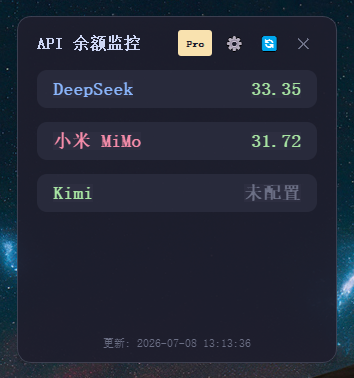
The Project: A Desktop Floating Monitor Widget
I wanted a tool that floats on top of my desktop and monitors API usage in real time. Showing my current DeepSeek token usage, request counts, and estimated costs. Something small, always visible, and dismissible.
Requirements:
- Floats on top of all windows (always-on-top)
- Shows real-time API usage stats
- Minimal UI — just the numbers I need
- Click to show/hide details
- Built with Python (the only language I know well enough to debug)
Hour 1: Setup and Prototype
9:00 AM — Opened VS Code, started Claude Code in the terminal.
My first prompt: Create a PyQt5 desktop widget that floats on top of all other windows, has a frameless design, shows a small window with a title and three number labels, and includes a close button.
Claude wrote 60 lines of PyQt5 code in 10 seconds. It worked on the first try. The window appeared, floated on top, and showed the label text. I was stunned.
Lesson 1: Be specific. A vague prompt like "create a widget" gets vague code. But "create a PyQt5 frameless window with three labels and a close button" gets you working code immediately.
Hour 2: Making It Actually Useful
10:00 AM — The widget showed static text. I needed real data from the DeepSeek API.
This was trickier. Claude wrote the timer logic correctly but got the DeepSeek API endpoint wrong. It was calling a non-existent endpoint. The AI does not always know the latest API documentation.
Lesson 2: You still need to read the documentation. I found the correct endpoint (/user/balance), told Claude the response format, and it fixed the code in one iteration. The AI does the implementation, but you need to verify correctness.
Hour 3: Polish and Error Handling
11:00 AM — The widget worked, but it was ugly and fragile. If the API was down, it crashed.
I broke the remaining work into four small prompts:
- Add a dark theme with dark background, light text, and subtle borders
- Add rounded corners and a subtle drop shadow
- Handle API errors gracefully — if the API fails, show "API Error" in red instead of crashing
- Make the widget draggable — click and drag to reposition
Each prompt took Claude about 10-20 seconds. I tested after each change. The workflow felt like: think, describe, review, test, describe again.
Lesson 3: Ask for one feature at a time. If I combined all four into one prompt, Claude would produce a messy result. Breaking features into individual prompts gave clean, testable increments.
Hour 4: The Config File and Final Polish
12:00 PM — Hardcoding my API key in the source code was a bad idea. I needed a config system with JSON file support, right-click context menu for "Refresh Now" and "Settings", and persistent window position between launches.
This was the most complex set of features — five interconnected changes. Claude handled it surprisingly well. The config system was clean, the context menu worked, and window position persisted across restarts.
Lesson 4: For complex multi-feature requests, list them clearly. Claude handles structured requests better than freeform descriptions. Give it a checklist, not an essay.
The Result: 4 Hours, 250 Lines of Working Code
| Metric | Value |
|---|---|
| Total lines of code | 247 (including comments) |
| Lines I actually typed | ~15 (config entries, one bug fix) |
| AI prompts sent | 12 |
| AI iterations | 18 (some prompts needed follow-ups) |
| Bugs found | 5 (all fixed by AI) |
| Cost | ~$0.30 in API tokens |
What Vibe Coding Is Good At (And What It Is Not)
Great for:
- Prototyping — go from idea to working prototype in hours, not days
- Boilerplate — let AI write the setup, config, and basic structure
- Learning — read the AI code to understand how frameworks work
- Single-page apps — dashboards, widgets, small tools are ideal
- UI work — CSS, layouts, and styling you would spend hours tweaking
Not great for:
- Complex system design — AI will not pick the right architecture for a large project
- Security-critical code — always review AI-generated auth and crypto code
- Performance optimization — AI generates correct but sometimes inefficient code
- Domain-specific logic — you still need to understand your own business rules
Tools I Used
| Tool | Purpose | Cost |
|---|---|---|
| VS Code | Editor | Free |
| Claude Code | AI pair programmer | $20/mo (Pro) |
| DeepSeek V4 API | Alternative model for testing | ~$0.30 for this project |
| PyQt5 | Desktop UI framework | Free |
You can swap Claude Code for OpenCode (free + open source) and bring the total cost to zero. Check out my OpenCode tutorial for details.
FAQ
Do I need programming experience for vibe coding?
You need enough to understand what the AI is doing and catch mistakes. You do not need to be a senior developer — if you can read code and understand logic flows, you can vibe code.
What is the cheapest vibe coding setup?
OpenCode (free) + Google Gemini API (free tier) + VS Code (free). Total: $0/month. Check my Google AI Studio guide for the free API key setup.
Can vibe coding replace real developers?
For small projects and prototypes, yes. For production systems with millions of users, security requirements, or complex data pipelines — no, not yet. The AI needs a human to make architectural decisions.
What frameworks work best?
Popular frameworks with lots of training data: React, PyQt, Flask, Astro, and Next.js are all excellent. Niche frameworks with little documentation produce less reliable results.